The educational need I have chosen to address is group projects. A lot of times when students are given a group project to work on, most of the work falls on one person or a few. This has happened to me in the past and it is not fair! By using Wikispaces, I will be able to see which students are contributing to the project and what they have contributed. Also, by using Wikispaces it will be easy for students and myself to make comments to help improve the project.
Another benefit of using Wikispaces is that it is on the Internet. This gives me the option of allowing students to work on it at school as well as at home. At the school I am currently working at, we have both a computer lab and laptop carts that I would be able to check out for my class to use.
The objective of this project will be to design a board game based on the history of Michigan. I am planning this project for a fourth grade class because that is when they study the history of Michigan, although it can be adapted to another grade level with a different topic. I want my students to use the wiki page to design the parts of the game. I will have assignments throughout the project that are due at designated times. These assignments will be the different parts of the project like the questions, rules, and materials. They will get feedback from me and their peers and will be able to improve the parts for the final product. I will be assessing the students based on what they contribute to the wiki page and then the final product, which is the actual board game.
Since I am not currently teaching my own class, I am putting together my plan to use in my future classroom. I may need to make changes to my plan based on the technologies I have available, when I have my own classroom.
Here are some sites I found useful information on wikispaces:
http://www.slideshare.net/kihitara/wikispaces-in-the-classroom-presentation
http://www.youtube.com/watch?v=xjHJXAODbH4
http://mrsroncone.wikispaces.com/Ways+to+use+a+wiki+in+your+classroom
Sunday, February 5, 2012

Saturday, January 21, 2012
Tuesday, December 13, 2011
Final Reflections
I have learned so much in my CEP 811 class! I feel so much more comfortable using technology to help enhance my lessons and improve student achievement. By evaluating lessons that others have made and my own using the UDL principals (Universal Design for Learning) I now understand how to incorporate technology in a beneficial way. I learned that when using technology it is very important to check to make sure everything is up to date and working properly. You do not want to start a lesson and find out midway that there are broken links. It is better to check before and make changes instead of having to rethink the lesson when you are in the middle of it.
I have learned some new technologies that I had never even heard of through taking this class. I really like the STAIR (Stand Alone Instructional Resource) designs we were able to create. This is a great way to engage students using technology! They can be used as another form of teaching a particular topic to introduce it or to help enforce it. I definitely want to explore these more and use them in my classroom when I have one of my own. I also enjoyed learning more about webpages. This is something I was already familiar with, but I was not completely comfortable creating one on my own. WebQuests are another tool I would like to use when I teach. These are a great way to have students explore and do research on the Internet in a secure environment.
I had many goals at the beginning of this course and I feel that I have met them. I wanted to learn new technologies and how to use them to help enhance my lessons to increase student achievement. It is very important to integrate technology into lessons for the purpose to help with student achievement and engage students. Technology should not just be used as a filler with no educational benefits. My new goals are to keep exploring these new technologies I learned and become even more comfortable with them. I also want to explore more technologies and how they can be used in my teaching. Lastly, I want to share what I have learned with other teachers that I work with and help them to start using them in their classrooms. I am going to reach these goals by continuing on taking classes toward my Master's Degree and by meeting with the technology group at my school to share my ideas.
I have learned some new technologies that I had never even heard of through taking this class. I really like the STAIR (Stand Alone Instructional Resource) designs we were able to create. This is a great way to engage students using technology! They can be used as another form of teaching a particular topic to introduce it or to help enforce it. I definitely want to explore these more and use them in my classroom when I have one of my own. I also enjoyed learning more about webpages. This is something I was already familiar with, but I was not completely comfortable creating one on my own. WebQuests are another tool I would like to use when I teach. These are a great way to have students explore and do research on the Internet in a secure environment.
I had many goals at the beginning of this course and I feel that I have met them. I wanted to learn new technologies and how to use them to help enhance my lessons to increase student achievement. It is very important to integrate technology into lessons for the purpose to help with student achievement and engage students. Technology should not just be used as a filler with no educational benefits. My new goals are to keep exploring these new technologies I learned and become even more comfortable with them. I also want to explore more technologies and how they can be used in my teaching. Lastly, I want to share what I have learned with other teachers that I work with and help them to start using them in their classrooms. I am going to reach these goals by continuing on taking classes toward my Master's Degree and by meeting with the technology group at my school to share my ideas.
Monday, December 5, 2011
Online Teaching Experiences
WebQuests are a great way to teach all different types of content. They require students to complete research on a certain topic by following links on the Internet. You can use them to teach all of the basic subjects in school, such as mathematics, science, reading, writing, and social studies. They can also integrate multiple subjects in one WebQuest. They are easy for students to use and help them get used to researching information on the Internet. The main thing you have to keep in mind when using a WebQuest is to make sure all of the links work. Since websites are continually changing, it is very important to keep your WebQuest up to date with resources that still exist.
With my students I would want to use a few different pedagogical strategies when teaching with WebQuests. First of all, students would be active learners by exploring the websites. I would also want to include collaboration. I think it is very beneficial for students to be able to discuss and work with other students.
In the elementary school some of the online learning technologies would be difficult to use. For instance, students in the lower grades (kindergarten and first) would not be able to create a blog or Wiki site because they do not have the skills yet to makes posts and comment. In these grades I think it would be great to use online simulations which are more engaging and do not require them to write or read in some cases.
There are so many great ways to teach online. I am looking forward to being able to incorporate them into my classroom when I have one of my own!
Michigan Merit Curriculum Online Experience Guideline Companion Document
With my students I would want to use a few different pedagogical strategies when teaching with WebQuests. First of all, students would be active learners by exploring the websites. I would also want to include collaboration. I think it is very beneficial for students to be able to discuss and work with other students.
In the elementary school some of the online learning technologies would be difficult to use. For instance, students in the lower grades (kindergarten and first) would not be able to create a blog or Wiki site because they do not have the skills yet to makes posts and comment. In these grades I think it would be great to use online simulations which are more engaging and do not require them to write or read in some cases.
There are so many great ways to teach online. I am looking forward to being able to incorporate them into my classroom when I have one of my own!
Michigan Merit Curriculum Online Experience Guideline Companion Document
Monday, November 21, 2011
Wikis Lab
As I searched through the Wikipedia site I discovered that the school I work at does not have a wiki page. I work at Maple Elementary School in Walled Lake Schools and since the district had a page already I decided to create a page for my school. I wrote that it is an elementary school in Walled Lake Schools and that it is located in West Bloomfield, MI. I also included a link to Maple's school website. Here is a screen shot of the page:

I have worked with Wikispaces in a few of the classes I have taken, so I was familiar with how to create a new page. In CEP 810 my group used a wiki page for our group project. In my new wiki page that I created for CEP 811 I included a link to this page. Here is a link: https://kaintechnologypage.wikispaces.com/
Sunday, November 20, 2011
UDL Guidelines
What is UDL? It is a set of guidelines for curriculum that gives all students equal opportunities to learn. It provides a guideline to create goals, lessons, materials, and assessments that work for everyone. It can be adjusted for individual needs in a classroom. This information came from the UDL Center.
Here is a link to a website I created and then evaluated using the UDL framework: http://www.merlot.org/merlot/viewMaterial.htm?id=595664&newcontribution=1
Here are screen shots of my UDL checklist:
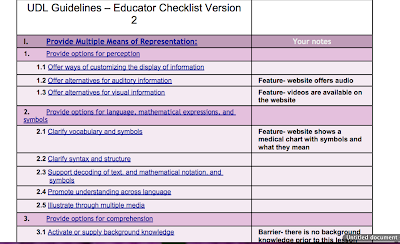


Here is a link to a website I created and then evaluated using the UDL framework: http://www.merlot.org/merlot/viewMaterial.htm?id=595664&newcontribution=1
Here are screen shots of my UDL checklist:


Friday, November 4, 2011
Evaluation of Learning Material in MERLOT
I found a great powerpoint on cyberbullying on the MERLOT website. http://www.merlot.org/merlot/viewMaterial.htm?id=574595 The content is high in quality. It has valid, useful information to teach about cyberbullying. This material can be used to explain what cyberbullying is and allows the learner to apply what they learn in scenarios involving cyberbullying. The learning objective of this powerpoint is to teach what cyberbullying is, how to prevent it, and what to do if it is happening. The targeted learner is someone in school, has access and is able to use many different forms of technology. This interactive powerpoint improves the teacher and students' ability to teach and learn the material. This can be easily used in a classroom to teach students the dangers of cyberbullying, how to prevent it from happening, and what to do if it happens. The software can be used in the classroom after an incident has happened or to inform students and hopefully prevent it from happening. It is very easy to see what the teaching-learning goals are in this lesson and it would be very easy to use to create learning assignments from.
I found the software to be very easy to use. The powerpoint has great links to more information and videos that are very easy to navigate back and forth from. It is interactive and provides immediate feedback from questions asked in the presentation. Students can easily use this, all they need to be able to do is click the mouse to move on to the next slide or answer a question. It presents information in the form of a list when explaining about cyberbullying, which is very familiar to students and much more interesting and attractive then seeing pages and pages of text. The whole presentation is presented using a dog as the speaker which adds another element of attraction.
I found this powerpoint presentation on cyberbullying very interesting and useful. It is something I would not hesitate to use in my own classroom to teach about this concept, especially with how much technology our students have available to them.
I found the software to be very easy to use. The powerpoint has great links to more information and videos that are very easy to navigate back and forth from. It is interactive and provides immediate feedback from questions asked in the presentation. Students can easily use this, all they need to be able to do is click the mouse to move on to the next slide or answer a question. It presents information in the form of a list when explaining about cyberbullying, which is very familiar to students and much more interesting and attractive then seeing pages and pages of text. The whole presentation is presented using a dog as the speaker which adds another element of attraction.
I found this powerpoint presentation on cyberbullying very interesting and useful. It is something I would not hesitate to use in my own classroom to teach about this concept, especially with how much technology our students have available to them.
Subscribe to:
Posts (Atom)